Drupal Image Uploading

Filed under: Uncategorized. Tags: ,

OK. I think I've just about gotten things closer to "feeling" right for me here. I was just fiddling with the Image and img_assist , and the drupalimage TinyMCE plugin, and finally got them all behaving as expected. Now, I can post an image to the blog while writing an entry, and it goes one step further than what WordPress did.

Drupal will create a completely independent "Image" content node, with full title/description/tag "metadata" and add it to an Image Gallery for later browsing and reuse. It's not just a file slapped in a folder on a server. It's a file slapped in a folder, with a bunch of supporting content and metadata to help organize it. That is so much more powerful/flexible than the straight "upload image" used by other blog apps.

So, I'm using the stock "Image" content type, with the "img_assist" module providing the upload service, and the "drupalimage" TinyMCE plugin providing a handy button right in the WYSIWYG editor to make it easy peasy to add images on the fly.

And, because it ties to the stock "Image" content type, I can also use things like the Image Publishing module to allow iPhoto to upload images directly to my copy(ies) of Drupal, for later use in blog posts and other content.

There are some minor wrinkles to iron out, then I'll roll it out to all of the Drupal sites we're running at work. Should be a handy way for our users to publish images – at least for the ones without Flickr accounts…
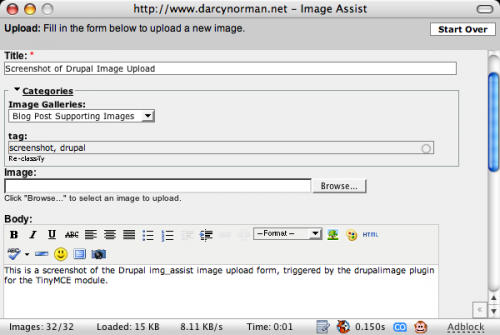
Screenshot of Drupal Image Upload: This is a screenshot of the Drupal img_assist image upload form, triggered by the drupalimage plugin for the TinyMCE module.Screenshot of Drupal Image Upload: This is a screenshot of the Drupal img_assist image upload form, triggered by the drupalimage plugin for the TinyMCE module.


Update: The HTMLArea module/editor has a similar image insert/upload utility. That one is even more streamlined, with less emphasis on creating a separate Image node (although that's what it does). Here's the HTMLArea utility, for comparison:
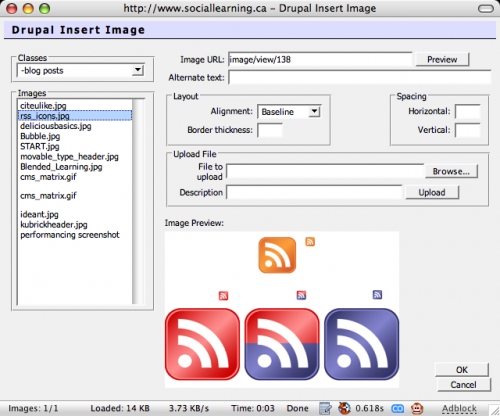
HTMLArea image insert/upload utility: A screenshot of the HTMLArea image insert/upload utility, taken from SocialLearning.ca  - running Drupal 4.6

HTMLArea image insert/upload utility: A screenshot of the HTMLArea image insert/upload utility, taken from SocialLearning.ca – running Drupal 4.6

Update 2: Looks like a bug in img_assist.module, which is adding some well-intentioned spans that are inadvertently borking image display on Mozilla browsers. By commenting out lines 1263 and 1287 of img_assist.module, everything appears to be hunky dory.

Comments

10 Responses to “Drupal Image Uploading”

  1. Jay says:

    Have you migrated these functions to Drupal 5?

  2. dnorman says:

    Drupal 5 has a better (IMO) image management strategy, with the “IMCE” module. Actually, it’s available for Drupal 4.7 as well.

    IMCE Project on Drupal.org

    The image, image assist, and related modules have also been upgraded to Drupal 5, so there are a lot of options available.

  3. Tony Spencer says:

    I was frustrated with all the solutions available for cobbling together. So I designed what I’d want in a Drupal image module and I’m truly happy with it now. I’m trying to get it into Drupal CVS as soon as possible so others can start improving and maintaining but feel free to give it a try. So far the feedback has been very positive!

    Image Picker

  4. [...] Drupal Image Uploading – D’Arcy Norman dot net (tags: drupal image) [...]

  5. draggin says:

    welcome to the geekzone… Tongue out

    D'Arcy, this is all truely impressive. I couldn't believe when you made the switch, (no more love for wordpress…?!) but I see you had some exceptional reasons for doing so. (This TinyMCE for one) I'm looking forward to tracking your progress.

    Also glad to see you like Performancing. I agree! If I got off my butt enough to blog more seriously, I know it would make life simpler.

    I hear you may be coming through town next week, hopefully we'll have a chance to see ya. peace.

  6. dnorman says:

    Jason – it isn't a lack of love for WordPress. I do love WordPress (well, as much as anyone can love some php files). It's a great platform, and was doing everything I could throw at it (and more) without breaking a sweat. The Switch was more about flexibility for the future, and consolidating my efforts into a single CMS. I'm using Drupal a LOT as part of my day job, and doing some consulting now, so it made sense to eat my own dog food.

    I'll be in Vancouver on Wednesday to visit the folks at BCIT, then over to Courtenay/Comox for the EdTech workshop. I'll be hanging out with Brian, and doing something fun with him in the "Social Software" session.

    Are you going to be there? Since you're a pretty heavy SocialLearning.ca contributor, that would only make sense…

    Wait – I just realized – Scott Leslie is on the presenters list, too! Awesome!

  7. Anonymous says:

    Cool

  8. Nico says:

    Just the information I needed, nice header picture,

    greetings from Holland,

    Nico 

  9. Anonymous says:

    Very nice!! Does it have multi upload feature just like http://www.imagecrack.com ?

  10. dnorman says:

    Haven't seen any multi-upload stuff for it. I just do it one at a time. The only time I use it is to post blog-post-supporting images, so maybe 1 per post anyway. Any bulk uploads get sent to Flickr via iPhoto anyway…

Leave a Reply